3 Onboarding an AI agent
Adding an AI agent to a clinical trial workflow is an onboarding problem before it is a technology problem.
3.1 The onboarding analogy
Imagine that a new team member has joined. They recently finished school and understand the basics of clinical trials. They know what a protocol and statistical analysis plan (SAP) are, but they do not yet know standard operating procedures (SOPs), computing environment, folder structure, naming conventions, or review habits of your organization.
For their first assignment, you choose a simple task:
Summarize the age distribution in a clinical trial’s ADSL dataset.
The task is deliberately small. You are onboarding them more on the workflow than the tool. Can the new colleague find and use the relevant documents? Can they identify the correct analysis population, handle missing values, notice protocol deviations, and report findings and assumptions?
Now replace “new colleague” with “AI agent.” Almost everything you would set up for a person still applies, but each item has to become something written down rather than something learned by sitting nearby.
| For a new colleague | For an agent |
|---|---|
| Orientation and procedural training | Written instructions supplied when needed |
| An invitation to ask when uncertain | Explicit conditions for stopping and escalation |
| Shadowing and code review | A record of sources, tool actions, and outputs |
| Access to the study environment | A bounded set of files, tools, and destinations |
| Managerial sign-off | A named human accountable for the result |
The model matters, but a more capable model does not define an acceptable result. The surrounding task and workflow establish the evidence, boundaries, and human decision rights.
3.2 What an AI agent is
A large language model (LLM) interprets supplied context and generates a response. The context includes the request, instructions, documents, prior messages, and tool results made available for the current interaction.
An AI agent adds a controlled execution loop around the model:
- interpret the task and select a next step;
- use an allowed tool, such as a document reader or R;
- observe the tool result and update the plan; and
- continue until the task is complete, blocked, or requires approval.
The main components are distinguished by their responsibilities:
| Component | Responsibility |
|---|---|
| LLM | Interpret context, plan steps, and draft an explanation |
| Harness | Assemble context, call the model, invoke tools, record events, and control the loop |
| Model gateway | Route model requests and apply authentication, logging, or policy controls |
| Tool interfaces | Perform observable actions such as reading a PDF, querying data, or running R |
| Working state | Hold messages, plans, tool results, and unresolved questions during the interaction |
| Accessible environment | Limit the files, commands, APIs, network destinations, and credentials the agent can reach |
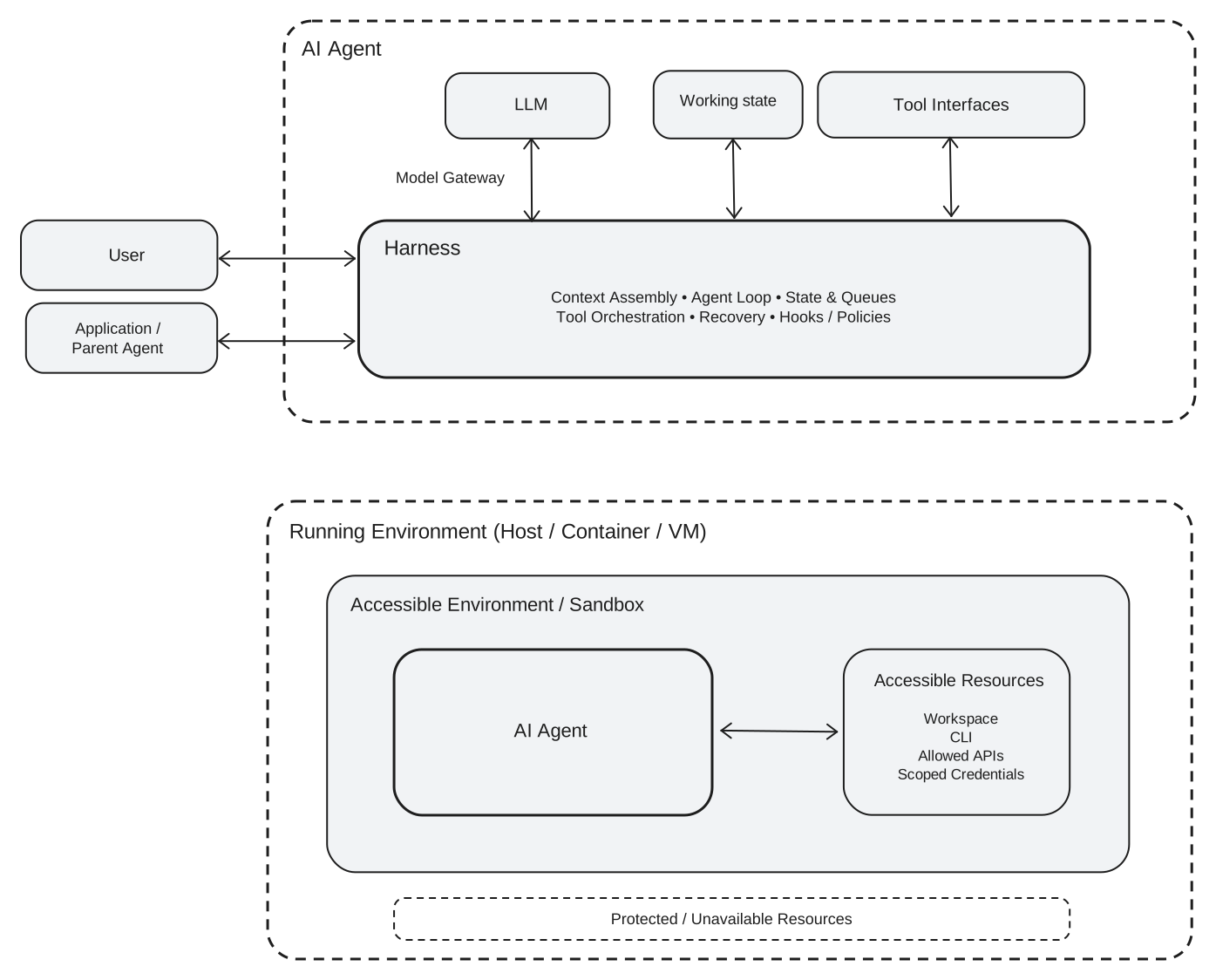
Two distinctions are important:
- Working state is not durable project memory. Rules and decisions that must survive an interaction belong in versioned artifacts rather than only in chat history.
- Tool access is not authority. The technical ability to edit a file or call an API does not grant approval or decision rights.
Tools also do not make a model reliable by default. An agent can omit a source, resolve ambiguity silently, write code without executing it, misread a tool result, or follow an instruction from an untrusted artifact. Bounded access, observable tool use, and human review limit the consequences and make failures easier to detect.
3.3 Make the task contract explicit
The task contract records the expectations for a delegated task. It is a small specification for the assignment rather than a prompt-writing trick.
| Part | Question | Age-summary example |
|---|---|---|
| Objective | What should be produced? | An age summary and a short review note |
| Inputs | Which artifact versions govern the work? | A public protocol and a named synthetic CSV snapshot |
| Scope | Which population and variables are relevant? | The protocol-defined population and AGE |
| Output | What must the result contain? | Statistics, executed R code, sources, assumptions, and questions |
| Boundaries | Which data, tools, and destinations are allowed? | Read-only access to the two linked public artifacts |
| Escalation | When should the agent stop or ask? | Missing artifacts, ambiguous scope, conflicting evidence, or suspected data issues |
A task contract does not require every uncertainty to be resolved in advance. It requires uncertainties to be visible so the agent does not silently turn an assumption into a decision.
3.4 A minimal AI-adoption example
This example demonstrates the smallest useful form of AI adoption: one person sends one prompt to an agent and receives one result. It is not presented as an AI-first workflow.
The CSV in this example is wholly synthetic and contains no participant data from KEYNOTE-189. It was constructed as a teaching example to be interpreted with the public KEYNOTE-189 protocol and cannot support any conclusion about that study.
3.4.1 Two teaching artifacts
| Artifact | Role in the demonstration |
|---|---|
| Public KEYNOTE-189 protocol | Supplies example population and age requirements |
kn189-synthetic-adsl.csv |
Supplies fabricated ADSL-style records for calculation |
Both links are pinned so a later reader retrieves the same bytes. The CSV URL names commit 0b5d05e (verified 2026-09-11 to serve content identical to the file in this repository); a later CSV revision needs a new pin. The protocol file Prot_SAP_001.pdf was served with Last-Modified: 2024-07-09 and inspected 2026-09-11.
The synthetic data include three enrolled but nonrandomized records, two missing AGE values, and one randomized record with an age below the protocol threshold. These conditions exist only to make assumptions and exceptions visible in the returned result.
3.4.2 One prompt in Arena Agent
For this demonstration, the entire assignment is sent to arena.ai in one request. The platform provides a concrete setting for showing what one agent interaction can accomplish; this chapter does not evaluate or benchmark the product.
This is a synthetic teaching exercise, not an analysis of KEYNOTE-189 trial data.

Using only the public KEYNOTE-189 protocol and the synthetic CSV linked below,
identify the protocol-defined analysis population and summarize its age
distribution. Use R for the calculation. Report the randomized-record count, nonmissing and
missing `AGE` counts, mean, standard deviation, median, Q1, Q3, minimum, and
maximum. State the R quantile method. Return the statistics, executed R code,
protocol sources, assumptions, and questions for human review.

Protocol:
https://cdn.clinicaltrials.gov/large-docs/80/NCT02578680/Prot_SAP_001.pdf

Synthetic data:
https://raw.githubusercontent.com/elong0527/ai4csr/0b5d05e9137667b9a5b1b8e92a893b01f8fe5800/exercise/day1/kn189-synthetic-adsl.csv

Do not search for or use published KEYNOTE-189 results. Do not modify the data.
3.4.3 One result
A sufficient response identifies the intention-to-treat population as the 25 synthetic records marked as randomized, runs the calculation in R, and reports one summary. The table is an independently computed expected result from the current synthetic CSV, not a captured Arena Agent response. The quartiles use R’s default quantile() method (type 7):
| Result from the synthetic ITT records | Value |
|---|---|
| Randomized records | 25 |
Nonmissing AGE |
24 |
Missing AGE |
1 |
| Mean | 50.58 |
| Standard deviation | 14.97 |
| Median | 51 |
| Q1 | 41.25 |
| Q3 | 61.25 |
| Minimum | 17 |
| Maximum | 76 |
The same response should flag the invented 17-year-old record for human review without removing it from the requested population. It should also include the executed code, cited protocol sections, assumptions, and unresolved questions requested by the prompt.
Here, one prompt enabled an agent to inspect a document, read data, execute R, and combine the observations into one answer. However, it remains one result from one interaction, not evidence that the task will be performed consistently.
3.5 Why the demonstration is adoption, not a workflow
The demonstration leaves the underlying process unchanged. A person manually starts the work, supplies the context, interprets the response, and decides what happens next.
| Missing workflow capability | What the demonstration does instead |
|---|---|
| Defined trigger | A person chooses when to send the prompt |
| Controlled artifact retrieval | Links are assembled inside one interaction |
| Repeatable execution contract | The agent may choose a different path on another run |
| Predetermined benchmark | The returned result is inspected after it is produced |
| Durable state | Findings and decisions remain in the interaction unless recorded elsewhere |
| Explicit decision record | Human follow-up is expected but not captured by the task |
The distinction is not a criticism of prompt-based use. AI adoption is a fast way to discover whether a task is valuable and what an agent can accomplish. The single result reveals the artifacts, tools, assumptions, exceptions, and human decisions that a future workflow must govern.
3.6 From one result to an AI-first workflow
The next design step is not a longer prompt. It is to turn the useful parts of the interaction into a bounded, repeatable process: define an event, version the task contract, retrieve the governing artifacts, execute deterministic checks, measure the result against a benchmark, record the human decision, and use that state in the next run.
The applied examples in this book make that transition through the shared AI-first SDLC defined in Chapter 4. Each example begins with a bounded business problem and develops the artifacts, evidence, and decision points needed to move beyond a single prompt.