2 Onboarding an AI agent
Adding an AI agent to a clinical trial workflow is an onboarding problem before it is a technology problem.
2.1 Day 1 onboarding scenario
Imagine that a new team member has joined. They recently finished school and understand the basics of clinical trials. They know what a protocol and statistical analysis plan (SAP) are, but they do not yet know standard operating procedures (SOPs), computing environment, folder structure, naming conventions, or review habits of your organization.
For their first assignment, you choose a simple task:
Summarize the age distribution in a clinical trial’s ADSL dataset.
The task is deliberately small. You are onboarding them more on the workflow than the tool. Can the new colleague find and use the relevant documents? Can they identify the correct analysis population, handle missing values, notice protocol deviations, and report findings and assumptions?
Now replace “new colleague” with “AI agent.” Almost everything you would set up for a person still applies, but each item has to become something written down rather than something learned by sitting nearby.
| For a new colleague | For an agent |
|---|---|
| Orientation and SOP training | Written instructions the agent reads on every run |
| “Ask me if you are not sure” | Explicit rules for when to stop and escalate |
| Shadowing and code review | A record of what it read, ran, and produced |
| An access request for the study drive | A bounded set of files, tools, and destinations |
| Their manager signs off | A named person accountable for the result |
Every row on the left is something a team handles informally for a person. On the right, it has to exist as an artifact that can be inspected.
Technical questions like which model to use, how much context it can take, how to keep responses consistent across sessions, or how to design prompts that reduce hallucinations matter a lot. But those are implementation choices. A better model can improve the answer, but only the workflow tells you whether the answer is acceptable.
2.2 What an AI agent actually is
A large language model (LLM) generates a response from the text it is given. Think of a very well-read colleague who answers only from what is placed in front of them, cannot get up to fetch a file, and cannot run code. Everything the model knows about your task has to arrive as text.
That text is called the context: your request, plus any documents, instructions, and previous results the system chose to include. A chatbot stops here. It talks; it does not act.
An AI agent adds a controlled loop around the model so it can act:
- interpret the task and choose a next step;
- use an allowed tool, such as a document reader or R;
- observe the tool result and update the plan;
- repeat until the task is complete, blocked, or requires approval.
For the age-summary task, that loop looks like: download the protocol, read the population definition, load the CSV, write R code, run it, read the output, notice a 17-year-old subject, and write up the result with a question attached.
The pieces that make this possible are easier to understand by what they do:
| Component | What it does |
|---|---|
| LLM | Interprets evidence, plans steps, drafts an explanation |
| Harness | Assembles context, calls the model, invokes tools, records events, and controls the loop |
| Model gateway | Routes model requests and may apply authentication, logging, or policy controls |
| Tool interfaces | Perform observable actions, such as reading a PDF, querying data, or running R |
| Working state | Holds the current messages, plan, tool results, and unresolved questions for this session |
| Accessible environment | Defines the files, commands, APIs, network destinations, and credentials the agent can reach |
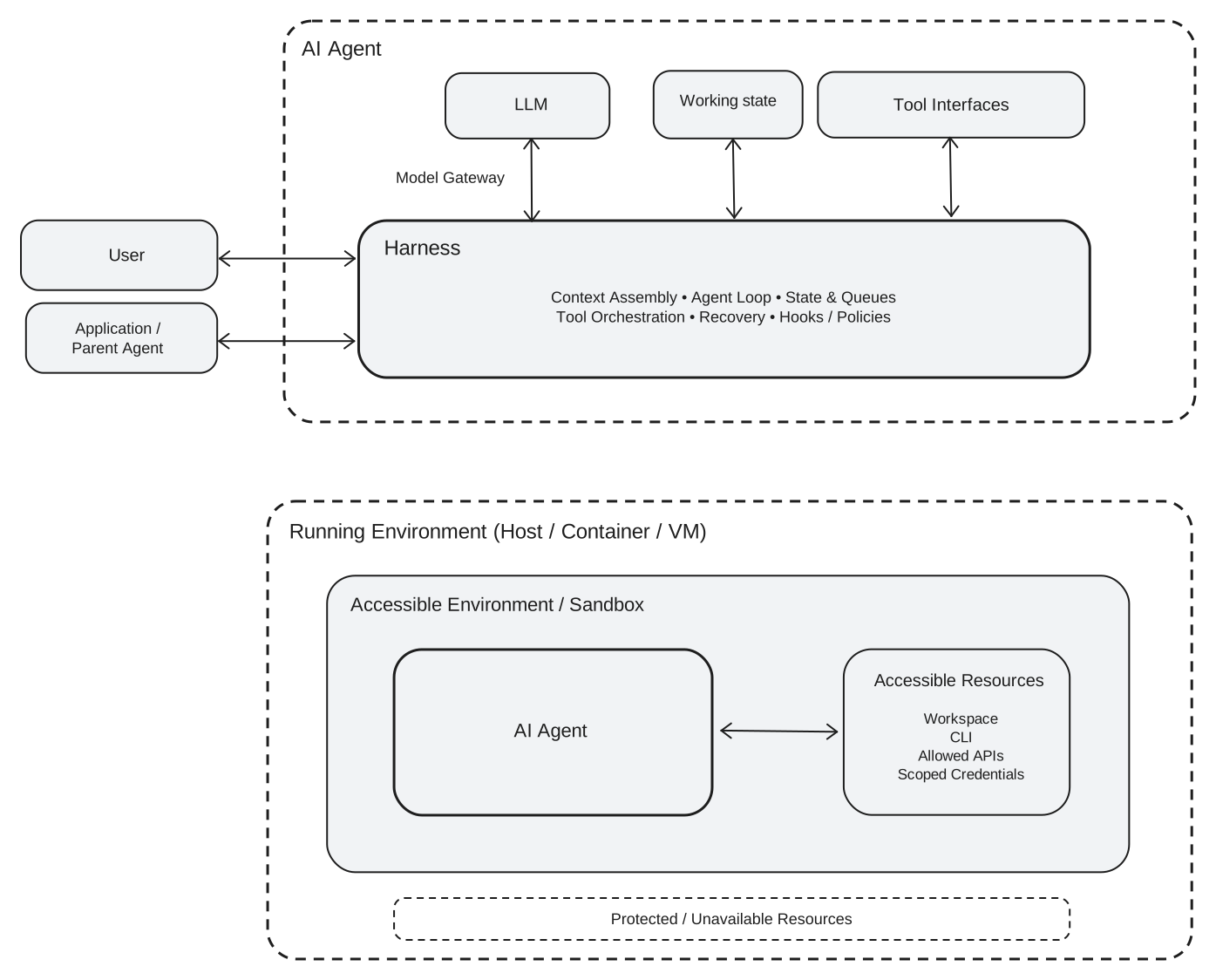
Two distinctions matter in practice:
- Working state is not project memory. Some systems retain a session; others do not. What the agent “remembers” from last Tuesday is not a governed record. Durable rules and decisions should live in artifacts that both people and agents can inspect.
- Tool access is not authority. The ability to edit a file or call an API does not mean the agent should do so without a workflow rule or human approval.
2.2.1 What an agent can still get wrong
Adding tools does not make a model reliable by default. The model produces the most plausible continuation of the text it was given, and plausible is not the same as correct. An agent can still:
- skip a governing document or cite a section that does not support its claim;
- resolve an ambiguity silently and present the assumption as a fact;
- draft code without executing it, or misread the output of a tool;
- treat an instruction embedded in an untrusted document as if it came from the user or workflow;
- expose data through a model request, log, temporary file, or network-enabled tool;
- take a different path, and report different numbers, when the same request is run twice; and
- change behavior again after a model, prompt, tool, or artifact is updated.
These are expected failure modes to design for, not unusual exceptions. Bounded access limits their impact; recorded evidence and human review make them easier to detect.
2.3 Make the task contract explicit
People learn local conventions by observation and correction. An agent does not reliably absorb those conventions unless the workflow records them and supplies them again when needed. Important expectations therefore belong in inspectable instructions, not in a team member’s memory or an old chat session.
A useful way to think about it: the task contract is a small SAP for the delegation itself. It has six parts:
| Part | Question to answer | Example for this task |
|---|---|---|
| Objective | What should be produced? | An age summary and a short review note |
| Inputs | Which artifact versions govern the work? | Protocol version and ADSL snapshot |
| Scope | Which population and variables are relevant? | To be confirmed from the protocol |
| Output | What must the response contain? | Results, executable code, sources, assumptions, and open questions |
| Boundaries | Which data, tools, and destinations are allowed? | Read-only access in an approved environment |
| Escalation | When should the agent stop or ask? | Missing artifact, ambiguous population, conflicting evidence, or suspected data issue |
In a production workflow, make these items as explicit as the task permits, so a human can review them. Ambiguity is not a test of intelligence when the cost of a wrong assumption is high.
The exercise later in this chapter deliberately breaks that rule: it leaves the population and summary statistics unspecified. That makes the agent’s assumptions visible in a low-risk setting. It is a teaching device, not a recommended pattern for a production request.
An instruction to “follow the SOP” is useful only if the agent can access the applicable SOP and identify its version. If a required document is unavailable, the correct behavior is to report the gap and stop the affected work.
2.4 Try it yourself
The exercise below runs the age-summary task end to end. Running it takes only a few minutes; the value is in the review that follows. It is deliberately a read-and-compute assignment: the agent may read the public artifacts and run code, but it should not change data or make a study decision.
2.4.1 Step 1: Get the materials
The exercise uses two public artifacts:
| Artifact | Purpose |
|---|---|
| KEYNOTE-189 protocol | Provides the entry criteria, analysis-population definitions, and demographic-summary guidance |
kn189-synthetic-adsl.csv |
Provides a small, synthetic ADSL-style teaching extract |
The extract mimics an in-progress data snapshot of 28 subjects. It contains three planted problems:
- three enrolled subjects who have not been randomized;
- missing
AGEvalues; - one randomized subject whose recorded age is below the protocol threshold.
It is a teaching extract, not a submission-ready ADaM dataset. Its simplified structure is another reason to state what can and cannot be concluded from it.
2.4.2 Step 2: Choose an appropriate agent
Use an approved agent that can read a PDF and CSV file and execute R. One public option is Arena Agent, which displays tool activity in the browser so you can watch each step. Availability and features of hosted tools can change; the exercise does not depend on this particular product.
The linked dataset is safe for this exercise because it is synthetic and already public. Do not upload confidential or proprietary data to a hosted agent unless that specific environment and data flow have been approved by your organization.
2.4.3 Step 3: Send the request
Give the agent the following request, without supplying the answer:
Based on the KEYNOTE-189 study protocol, summarize the age distribution in the data.

Protocol:
https://cdn.clinicaltrials.gov/large-docs/80/NCT02578680/Prot_SAP_001.pdf

Data:
https://raw.githubusercontent.com/elong0527/ai4csr/refs/heads/main/exercise/day1/kn189-synthetic-adsl.csv

Show the results, the R code, and questions.

Use only these two documents. Do not search the web for published results of this trial.
The last instruction matters. KEYNOTE-189 is a published trial, so an agent that searches instead of reading can return demographics from online information and never open your dataset at all.
2.4.4 Step 4: Watch the process, not only the answer
Some things are visible only while the agent works, so watch the tool activity instead of waiting for the final text:
- Did it open the protocol and the CSV, or answer from published knowledge of the trial?
- Did it execute code, or only display code that looks plausible?
- Where did it pause, backtrack, or retry?
Then send the same request a second time. The agent may take a different route and may report different numbers. Seeing that once is the fastest way to understand why the review below examines evidence rather than prose.
2.5 Review the result
Reviewing an agent means checking its evidence and actions, not asking whether its prose sounds confident. It is closer to reviewing an independent QC program than to reading a memo. Use these five checks in order:
| Check | The question it answers |
|---|---|
| 1. Sources | Did it read the right documents? |
| 2. Scope and assumptions | Does it say what it decided on your behalf? |
| 3. Reproducible calculations | Did the reported numbers come from code that ran? |
| 4. Exceptions and open questions | Did it surface what it could not resolve? |
| 5. Trail and data boundary | Can the work be reconstructed, and did data stay put? |
2.5.1 1. Sources
Ask:
Which artifact versions and sections did you use? Show the evidence for each analysis rule.
For this task, a sound response should find at least three pieces of protocol evidence:
- Section 5.1.2, criterion 6 sets the minimum age at 18 years;
- Section 8.5.1 defines the intention-to-treat (ITT) population as all randomized subjects;
- Section 8.6.3 says demographic variables such as age are summarized by treatment using descriptive statistics or categorical tables.
A citation shows where a claim came from. It does not prove that the agent interpreted the claim correctly, so the next checks still matter.
2.5.2 2. Scope and assumptions
Ask:
Which subjects and treatment variable did you use, and which choices remain assumptions?
The original request does not identify an analysis population or say whether the summary should be overall or by treatment. The protocol makes ITT a reasonable choice for a randomized-subject summary, but it does not remove every ambiguity from the request. A good response states its choice and asks for confirmation.
2.5.3 3. Reproducible calculations
Ask:
Show the exact code that produced the reported numbers. How did you handle missing values and calculate quartiles?
Run the code in the approved environment. Confirm that the executed filter, missing-value handling, and statistical functions match the written method. Generated code that was never run is not reproducible evidence.
For reference, these are the results for two possible populations:
| Statistic | ITT (ITTFL == "Y") |
All enrolled (ENRLFL == "Y") |
|---|---|---|
| Total subjects | 25 | 28 |
Nonmissing AGE |
24 | 26 |
Missing AGE |
1 | 2 |
| Mean | 50.58 | 51.46 |
| Standard deviation | 14.97 | 14.73 |
| Q1 | 41.25 | 42.50 |
| Median | 51.00 | 52.50 |
| Q3 | 61.25 | 61.75 |
| Minimum | 17 | 17 |
| Maximum | 76 | 76 |
The table uses R’s default sample-quantile method (type = 7). Quartiles are method-dependent: the default SAS definition gives Q1 = 40.50 and Q3 = 61.50 for the same ITT records. Neither method should be substituted silently for the other. State the software and method, then compare results calculated with the same definition.
data_url <- paste0(
  "https://raw.githubusercontent.com/elong0527/ai4csr/",
  "refs/heads/main/exercise/day1/kn189-synthetic-adsl.csv"
)

adsl <- read.csv(
  data_url,
  na.strings = c("", "NA")
)

summarize_age <- function(data) {
  age <- data$AGE

  c(
    total = length(age),
    nonmissing = sum(!is.na(age)),
    missing = sum(is.na(age)),
    mean = mean(age, na.rm = TRUE),
    sd = sd(age, na.rm = TRUE),
    q1 = unname(quantile(age, 0.25, na.rm = TRUE, type = 7)),
    median = median(age, na.rm = TRUE),
    q3 = unname(quantile(age, 0.75, na.rm = TRUE, type = 7)),
    minimum = min(age, na.rm = TRUE),
    maximum = max(age, na.rm = TRUE)
  )
}

summarize_age(subset(adsl, ITTFL == "Y"))
summarize_age(subset(adsl, ENRLFL == "Y"))
2.5.4 4. Exceptions and open questions
Ask:
What looked incomplete, inconsistent, or out of scope? What did you do about it?
The agent should report at least these observations:
- three enrolled subjects have
ITTFL == "N"and no treatment value; - two subjects have missing
AGE, one of them inside the ITT population; and - subject
KN189-103-025is randomized withAGE == 17, below the protocol’s minimum age.
The 17-year-old subject illustrates the difference between analysis and escalation. If ITT is used, the subject remains in the summary because ITT includes all randomized subjects. The apparent protocol deviation is reported for human review; it is not quietly “fixed” by deleting the record. An agent that drops the record and reports a clean mean of 52.04 has produced the most dangerous kind of answer: correct-looking and wrong.
Useful open questions include:
- Should the requested summary use ITT, all enrolled subjects, or another population defined in a study specification?
- Is an overall summary sufficient, or is a by-treatment display required?
- Is the missing or underage value a source-data issue, a derivation issue, or a confirmed protocol deviation?
An unresolved question is not a failure. Hiding an unresolved choice behind a confident answer is.
2.5.5 5. Trail and data boundary
Ask:
Which files did you open, which commands did you run, and what data left the approved environment?
Treat the agent’s narrative as a claim. The stronger evidence is the harness or platform record showing tool calls, command output, approvals, errors, and data transfers. If the platform cannot provide enough evidence to reconstruct the work, record that as a workflow gap.
A correct mean does not demonstrate that the process is acceptable. Compare the observed trail with your requirements for access control, audit trails, software qualification or validation, reproducibility, and review.
2.5.6 When a check fails
A failed check is usually information about the request, not a verdict on the agent. If the summary quietly excluded the underage subject, the request never said what to do with an apparent protocol deviation. If the population is wrong, the request never named one. The productive response is to supply the missing part of the task contract and run the task again, not to argue with the model or to accept a second answer that merely sounds more careful.
Some gaps cannot be closed by a better request. If the platform cannot show which files were opened and which commands ran, no wording will produce that evidence. Record it as a workflow gap and decide whether the task belongs on that platform at all.
2.6 Keep raw data separate when possible
The model often does not need subject-level records. Statistical software can process raw data inside a controlled environment and return only the information needed for reasoning or reporting:
Raw ADSL -> controlled R/SAS/Python calculation -> aggregate result -> LLMThe exercise above does not follow this pattern, which is worth noticing. The request hands the agent a link to the CSV, so the agent will most likely read all 28 records into its context before computing anything. That is acceptable here because the extract is small, synthetic, and already public. With a real ADSL snapshot it would not be: the data should stay in the controlled environment, and only the summary should reach the model.
This pattern applies two useful controls:
- Least privilege: the agent can reach only the files, commands, network destinations, and credentials needed for the task.
- Data minimization: the model receives only the fields or aggregates needed for its role.
These controls reduce exposure; they do not guarantee confidentiality. Model requests, tool output, logs, session history, temporary files, caches, and telemetry all require deliberate treatment. A process often inherits the permissions of the account that launched it, so isolation must be configured and tested.
Give the agent access to what the task requires, not everything the running environment happens to expose.
2.7 Keep human accountability explicit
The agent can gather evidence, execute a deterministic calculation, identify exceptions, and draft an explanation. It cannot own the scientific or regulatory decision.
Even for a task this small, a named reviewer still has to accept that the variables mean what the analysis assumes, that the population and handling of exceptions match the objective, and that the result is fit for its intended use.
The same division of responsibility becomes more important when the work involves treatment groups, derived variables, imputation, endpoints, inferential methods, or submission deliverables.